
How to turn your Android into a dumb phone (without buying one)
Dumbphones are having a moment, and for good reason. A phone that only calls and texts can't eat your evening. But most people who buy one hit the same wall within a week. They still need WhatsApp, maps, a banking app, two-factor codes and a decent camera. Here is how to get the dumbphone effect from the phone you already own.
You don't need a second phone. Use a minimal home screen, turn on greyscale, cut notifications, and, most importantly, make the distracting apps disappear for set hours rather than deleting them. FocusComet's Vanish Mode does that last part, and Hard lock stops you undoing it early.
Why a real dumbphone often doesn't last
- WhatsApp and other messaging apps: most feature phones don't run them, or run a stripped-down version.
- Two-factor codes and banking: many banks now expect a smartphone app.
- Maps, tickets, payments: daily life assumes a smartphone.
- Two devices: carrying, charging and switching SIMs gets old fast.
The result is a drawer with a dumbphone in it. The goal was never “no smartphone”. It was “no endless apps”. You can get that from software.
Step 1: strip the home screen
Move everything off the home screen except the handful of tools you use on purpose: phone, messages, maps, camera, calendar. A plain wallpaper helps. A minimalist phone setup covers this step in detail, including text-only launchers.
Step 2: turn on greyscale
Colour is a big part of what makes apps feel rewarding. Android's Bedtime mode can turn greyscale on at night, and on most phones you can also turn it on all day in Accessibility or Digital Wellbeing settings. It makes Instagram feel like a newspaper.
Step 3: cut notifications to people only
In Settings › Notifications, switch off everything except calls, messages from real people and anything you truly need, such as a bank or calendar. A dumbphone's real superpower is silence.
Step 4: make the distracting apps vanish
This is the step a launcher alone can't do. Minimal launchers hide icons, but the app drawer and search are still one swipe away. Deleting apps works until you reinstall them on a bad day.
FocusComet's Vanish Mode takes the middle path. During a session, the apps you choose disappear from your home screen, app drawer and dock, so the phone really does feel like a basic phone. Your essentials stay: WhatsApp, maps, the bank app. When the session ends, everything comes back. Nothing is deleted, and no settings are lost.
- Dumbphone hours: put a session on a schedule, such as your evening or weekend mornings.
- Allow-only profiles: flip the list around. Pick the few apps you want, and everything else vanishes. This is the closest thing to a true dumbphone on Android.
- No backing out: Hard lock removes the End button and keeps Settings shut until the timer ends.
Step 5: keep it reversible
The beauty of a software dumbphone is that it bends. Need a smartphone at work and a basic phone in the evening? Use different profiles for different hours. Travelling and need everything? Just don't start a session. A brick of plastic can't do that.
Dumbphone vs dumbphone mode: quick comparison
| Real dumbphone | Android in dumbphone mode | |
|---|---|---|
| WhatsApp, maps, banking | Usually limited or missing | Kept |
| Social media | Gone | Gone during sessions |
| Cost | A second device | Free to start |
| Can you undo it on a bad day? | Only by swapping phones | Not with Hard lock on |
| Flexible by time of day | No | Yes, with schedules |
If you like the idea of a physical commitment device, see our Brick alternative guide for how that approach compares.
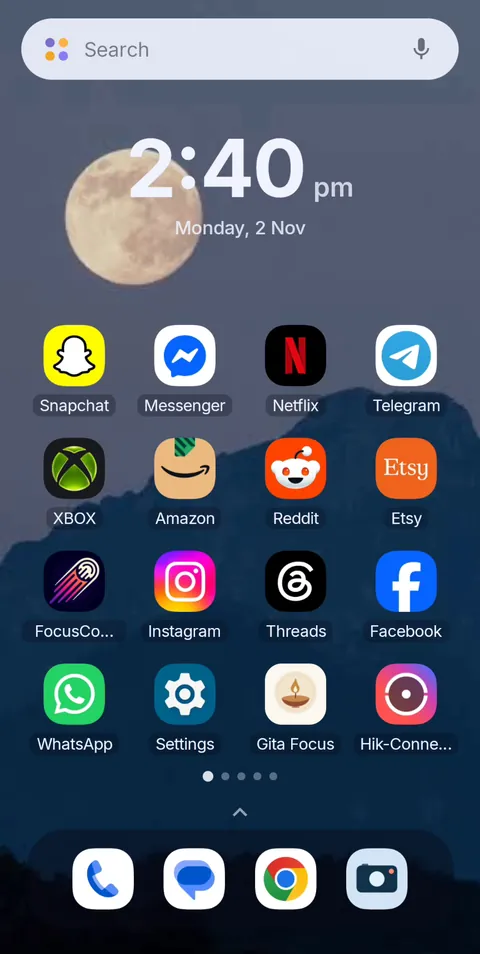 Before
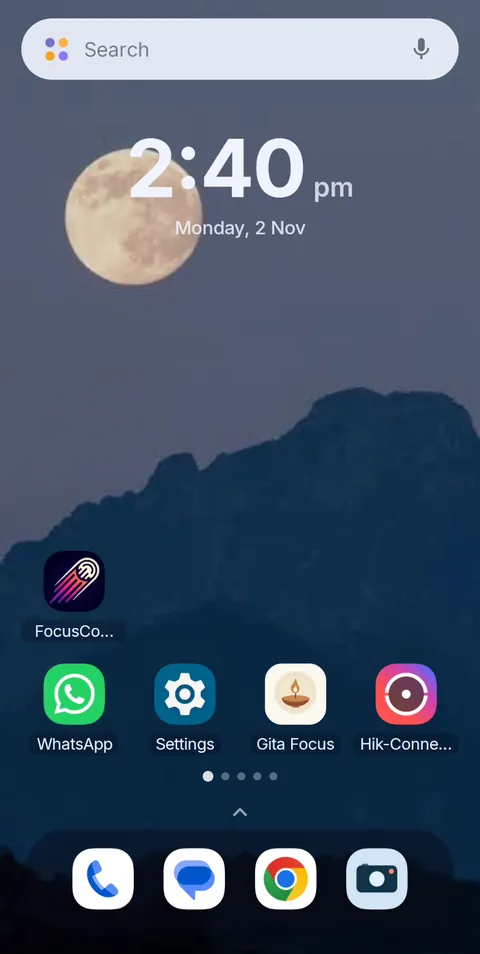 During Vanish Mode
Dumbphone mode for the phone you already own
FocusComet makes distracting apps vanish from your Android for the hours you choose, while WhatsApp, maps and the other essentials stay. Free on Android, with Allow-only profiles and Hard lock when you want the full dumbphone.
Get it on Google PlayFrequently asked questions
Can I turn my Android phone into a dumb phone?
Yes. Strip the home screen, turn on greyscale, limit notifications to people, and hide distracting apps for set hours with an app like FocusComet. You keep WhatsApp, maps and banking without the feeds.
Is there a dumbphone with WhatsApp?
A few feature phones support WhatsApp, but many don't, and support can change. Using your current Android in a dumbphone mode is often the simpler way to keep WhatsApp while losing social media.
What is the best dumb phone app for Android?
Minimal launchers change how the home screen looks. Apps like FocusComet go further and make distracting apps disappear from the home screen and app drawer for a session, then bring them back. That's closer to how a dumbphone feels.
Can I allow only a few apps and hide everything else?
Yes, with FocusComet. Allow-only profiles let you choose the apps you want during a session, and everything else is hidden.
Will I lose my apps or data?
No. FocusComet hides apps for the length of a session. Nothing is uninstalled, and your accounts and settings are untouched when the apps return.