
How to stop using your phone at night
You get into bed at 11 and look up at 1. Night-time phone use is its own kind of habit. You are tired, so your self-control is at its lowest. The bed is comfortable. And the feed has no natural end. That is why trying harder rarely works. Changing the setup does.
Decide on a phone curfew about an hour before bed. Make it automatic with a schedule that hides or blocks your scroll apps. Charge the phone outside arm's reach, and use a real alarm clock. Android's Bedtime mode helps, but it doesn't stop apps opening. A focus app that hides them does.
Why night-time scrolling is so sticky
- Low willpower: by the end of the day you have made hundreds of decisions, and “one more video” wins easily.
- Revenge bedtime procrastination: if your day felt like it belonged to other people, late night feels like the only time that's yours, so you stretch it.
- No stopping cue: infinite feeds and autoplay never give you a natural place to stop.
- The phone is the alarm clock: so it lives next to your pillow, the worst possible place.
The real cost is less about blue light than lost sleep. Every half hour of scrolling is usually half an hour of sleep you don't get back.
1. Set a phone curfew, not a bedtime
“I'll sleep at 11” fails because the phone is still in your hand at 10:59. Instead, set the time the scroll apps go away, for example 10 pm. Bedtime follows more naturally when there is nothing left to do on the phone.
2. Make the curfew automatic
Any rule you have to start yourself, at night, will lose. Put it on a schedule. In FocusComet you can add a nightly wind-down schedule to a profile that hides Instagram, TikTok, YouTube and the rest:
- Block Mode schedules start by themselves at the set time.
- Vanish Mode schedules send an alert, which can be full-screen, and with one tap the apps disappear from your home screen and app drawer until the session ends.
Set it once, for example 10 pm to midnight, which covers most people's danger zone, and it runs every night.
3. Turn on Bedtime mode
Android's Bedtime mode (in Digital Wellbeing) turns the screen grey and switches on Do Not Disturb overnight. Greyscale makes video feeds noticeably duller. It won't stop you opening an app, but it pairs well with a schedule that does.
4. Charge your phone out of reach
Across the room, or better, outside the bedroom. If reaching the phone means getting out of bed, most late-night urges die on the spot. This is the single most effective change on this list, and it costs nothing.
5. Buy a real alarm clock
A cheap alarm clock removes the main excuse for keeping the phone by the bed. It also stops the morning version of the habit: the alarm goes off, and you are scrolling before you are awake.
6. Keep one calm thing within reach
Don't just remove the phone. Replace it. A paper book, a podcast on a speaker or an audiobook with a sleep timer all fill the same “something before sleep” slot without the endless feed. Ideas in apps to replace doomscrolling.
7. Lock in on the nights that matter
Before an exam, an early flight or a big day, you may not trust yourself even with the apps hidden. FocusComet's Hard lock starts a session with no End button. The apps stay hidden and Settings stays shut until the time you chose.
8. Make mornings phone-free too
The night habit and the morning habit feed each other. Keep the scroll apps hidden for the first 30 minutes after you wake up. It makes the evening curfew easier to keep, because the phone stops feeling like the first and last thing in your day.
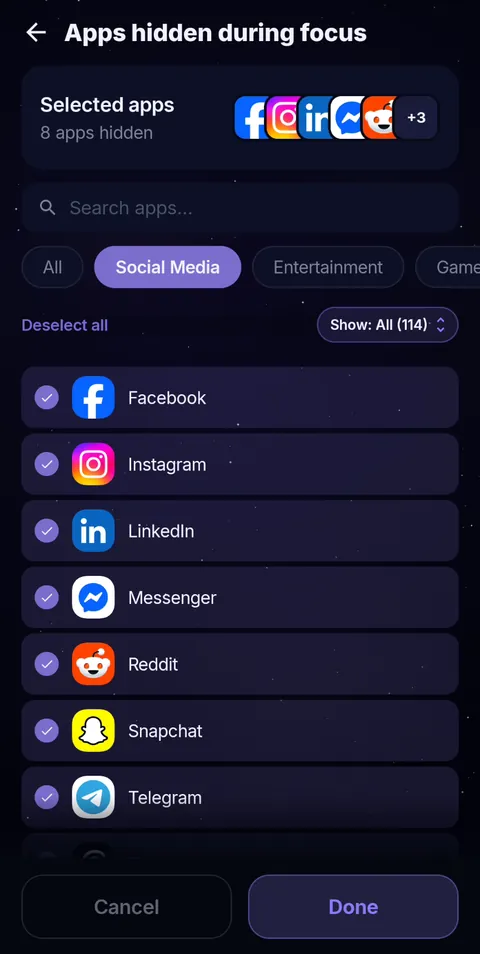 Pick the apps
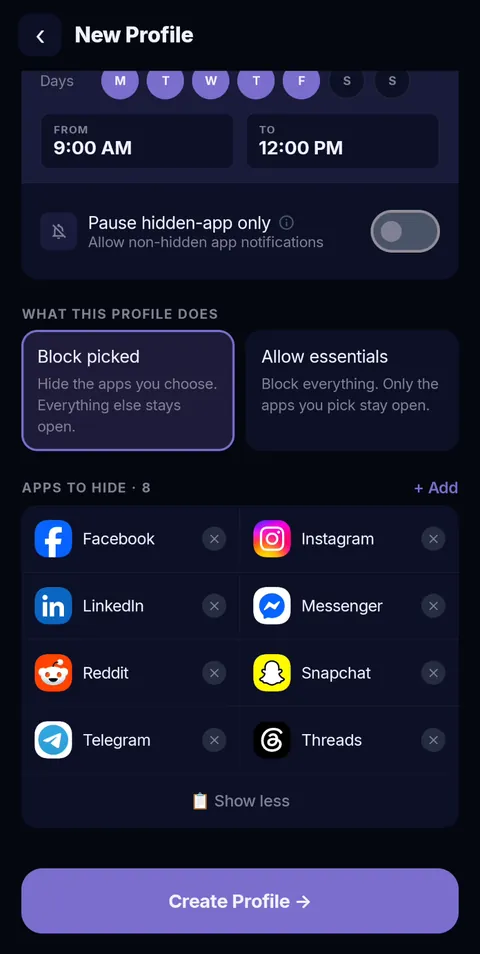 Schedule it
A nightly curfew that runs itself
FocusComet hides your scroll apps on a nightly schedule, with a full-screen alert if you like, and brings them back in the morning. Free on Android.
Get it on Google PlayFrequently asked questions
How do I stop using my phone before bed?
Set a phone curfew about an hour before bed, put it on an automatic schedule that hides or blocks your scroll apps, and charge your phone out of reach with a separate alarm clock.
Is there an app to stop using my phone at night?
Yes. Android's Bedtime mode makes the screen grey and silences notifications. FocusComet goes further and hides your distracting apps on a nightly schedule, with an optional Hard lock that can't be ended early.
Does Bedtime mode block apps?
No. Bedtime mode turns on greyscale and Do Not Disturb, but apps still open normally. Pair it with Focus mode or a focus app if you want apps blocked or hidden.
Why can’t I stop scrolling at night?
You are tired, so self-control is low. Feeds have no natural stopping point, and many people stretch the evening because it feels like their only free time. Changing the setup works better than relying on willpower.
How long before bed should I stop using my phone?
Thirty to sixty minutes is a common, realistic target. Start with 30 and build up. Consistency matters more than the exact number.