
How to lock yourself out of your phone (for an hour, a night or a set time)
Sometimes you don't want a gentle reminder. You want the phone to be off-limits for the next hour. There are three ways to do it: lock the phone in a box, use Android's own tools, or use an app that locks the distracting parts and leaves the rest working. Each has a catch, so here is how to pick.
A timed lock box is the most absolute, but it also locks away calls, maps and two-factor codes. Android's Focus mode and Bedtime are free but end with one tap. An app with a hard lock sits in between. It locks the apps that pull you in, leaves the apps you allow, and can't be ended early. FocusComet's version is called Hard lock.
Option 1: a timed lock box
Kitchen safes and phone lock boxes with a built-in timer are the most literal answer. You put the phone in, set the timer, and the lid won't open until it hits zero. Nothing is more certain.
The catch: it locks away everything. You can't take an urgent call, check a map, use your banking app's sign-in code, or be reached by family. It also needs a box with you wherever you go. Lock boxes suit a fixed spot, like an evening at home, much better than a day out.
Option 2: Android's built-in tools
- Focus mode (Digital Wellbeing) pauses the apps you pick, on demand or on a schedule.
- Bedtime mode turns the screen grey and silences the phone overnight.
- App timers give each app a daily limit.
- Samsung Modes and Routines can switch these on automatically.
The catch: they are designed to be easy to undo. “Take a break” and “Ignore for today” are always one tap away. That is fine for building awareness, but it isn't really locking yourself out. More on this in our Digital Wellbeing alternatives guide.
Option 3: an app that locks the distracting parts
Most people don't actually want to be cut off from their phone. They want to be cut off from the five apps that eat their evening. That is the gap focus apps fill, and the strongest ones have a strict mode you can't switch off early.
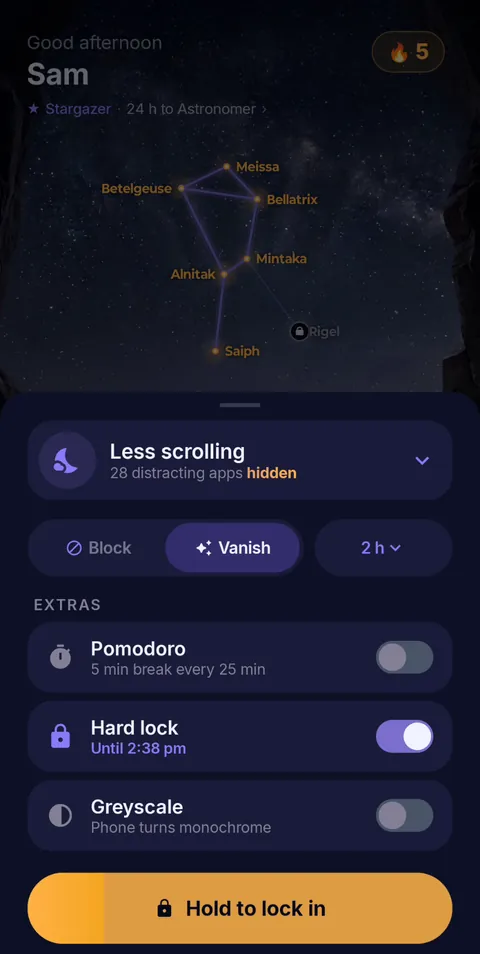 Hold to lock in
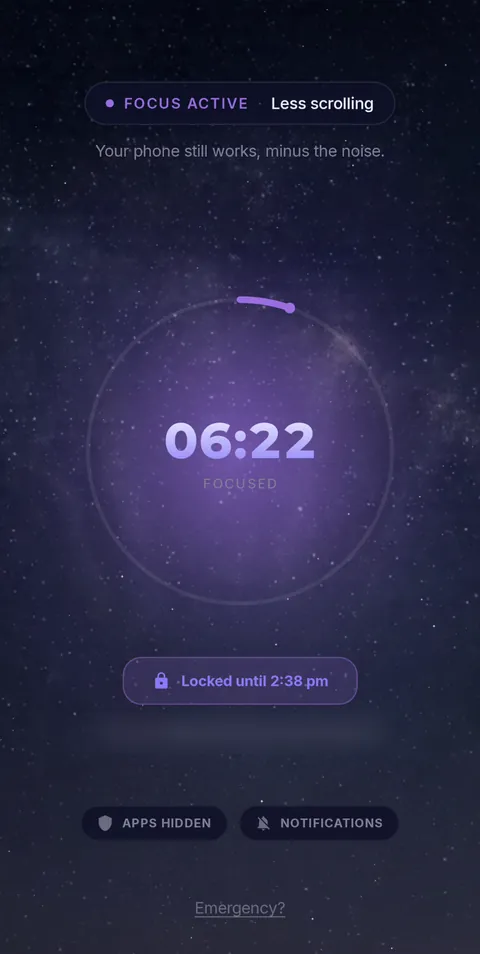 Locked until the timer ends
Here is how it works in FocusComet:
- Pick the apps to lock away. In Vanish Mode they disappear from your home screen and app drawer. In Block Mode they stay visible but bounce you back.
- Choose how long. One hour, an afternoon or a whole evening. Hard lock shows exactly when you will be free, for example “Until 10:30 pm”.
- Hold to lock in. From then on there is no End button, and Android Settings stays shut until that time.
- The apps you need stay. Any app you allowed, such as Maps, your bank or a messaging app, stays available.
Which one should you choose?
| You want to… | Best fit |
|---|---|
| Be completely unreachable for an evening at home | Timed lock box |
| Nudge yourself, with an easy way out | Focus mode or app timers |
| Stay off social apps but keep maps and 2FA | An app with a hard lock |
| Lock out the same hours every day | A schedule (see locking apps until a certain time) |
Locking yourself out for an hour
An hour is the perfect place to start. It is long enough to finish real work and short enough that you won't dread it. Try a single locked hour each day for a week before going longer. If you can't get through an hour, a longer lock will only make you resent it.
Locking yourself out at night
Night is when “one more video” wins most often. Lock the apps from about an hour before bed until morning, and charge the phone away from your pillow. We go deeper in how to stop using your phone at night.
Be kind to future you
- Keep an exit for real emergencies. With FocusComet, the “Emergency?” link on the session screen leads to support, who can end a session remotely.
- Start short, then stretch. Success builds the habit. Failure builds the urge to quit the method.
- Lock the apps, not your life. Being reachable makes it far easier to commit to a long lock.
Lock out the scroll, not the phone
FocusComet hides or blocks the apps you choose for a set time. Turn on Hard lock and there's no early exit, while the apps you allowed keep working.
Get it on Google PlayFrequently asked questions
How do I lock myself out of my phone for an hour?
Start a one-hour session in a focus app with a strict mode, such as FocusComet's Hard lock, or put the phone in a timed lock box. A strict-mode app locks only the apps you choose, so everything else keeps working.
Can I lock my phone until a certain time?
Android can't lock the whole phone on a timer by itself, but focus apps can lock chosen apps until a set time. FocusComet's Hard lock shows the exact time you'll be free and keeps Settings shut until then.
Are phone lock boxes worth it?
They are the most certain option and work well at home. The drawback is that they lock away everything, including calls, maps and sign-in codes, so they suit evenings in better than days out.
What if I need my phone in an emergency?
During a FocusComet Hard lock, the Emergency? link on the session screen points you to support@focuscomet.com, where the support team can end the session remotely.