
How to lock your phone while studying
You sit down to revise, check one message, and forty minutes later you are deep in Reels. That isn't a character flaw. A phone within reach keeps pulling at your attention even when it is face down. Here are six ways to lock it away while you study, from free habits to a lock you can't end early.
For a single session, put the phone in another room. For a daily routine, use an app that hides distracting apps during study blocks and brings them back afterwards. For exams and deadlines, use a strict mode that can't be ended early. FocusComet does both on Android: Vanish Mode hides the apps, and Hard lock keeps you in until the timer ends.
Why your phone wrecks study sessions
The obvious cost is the time you spend on it. The hidden cost is the switch back. After every “quick check” your brain has to reload what you were working on: the problem, the paragraph, the formula. A few checks an hour is enough to keep you from ever reaching deep concentration.
There is also the pull of the phone just being there. Studies of “brain drain” have found that people did slightly worse on attention tasks when their phone was on the desk rather than in another room, even when they never touched it. The research is debated, but the advice holds anyway: the less visible the phone, the less it costs you.
1. Put it in another room (free, surprisingly strong)
Distance is the simplest lock there is. If checking your phone means getting up and walking, most urges pass before you reach the door. Use a cheap kitchen timer or a laptop timer so you don't need the phone to track your session.
Weak spot: it only works if you can leave the phone behind. In a library, or if you use the phone for flashcards or a study timer, it falls apart.
2. Turn on Do Not Disturb or Focus mode
Android's Do Not Disturb silences notifications, and Digital Wellbeing's Focus mode greys out the apps you pick. Both are free and built in. Find Focus mode in Settings › Digital Wellbeing & parental controls. Samsung phones call it Modes and Routines.
Weak spot: one tap turns it off, and the greyed-out icons are still sitting there, reminding you they exist.
3. Use the Pomodoro rhythm, with the phone as the reward
Study for 25 to 50 minutes, then take a 5 to 10 minute break. Knowing the phone is coming back soon makes it much easier to leave it alone now. Keep the break short and set a timer for it as well, or one break becomes the whole evening.
FocusComet can run this rhythm for you. With Pomodoro on, your apps vanish for 25 minutes, return for 5, and vanish again without you touching anything.
4. Hide the apps that steal your study time
This is where a focus app earns its place. Instead of a block screen you tap past, hiding the apps takes them off the screen entirely. In FocusComet's Vanish Mode, Instagram, TikTok, YouTube and anything else you choose disappear from your home screen, app drawer and dock for the session. Your study tools stay: the calculator, the dictionary, your flashcard app, your class group chat. When the timer ends, everything comes back exactly where it was.
Prefer to keep the icons? Block Mode leaves your home screen alone and sends you back to your session when you open a blocked app.
5. Schedule your study blocks
The hardest part of studying is often starting. A schedule takes the decision away. In FocusComet you can set a study block that begins at the same time every weekday. A Block Mode schedule starts by itself. A Vanish Mode schedule sends an alert, full-screen if you like, and starts with one tap.
6. Use a hard lock for exam weeks
If you keep ending sessions early, you need a lock that ignores you in a weak moment. FocusComet's Hard lock is a strict mode. You hold a button to lock in, and the End button disappears until the timer runs out. Android Settings is blocked too, so you can't switch the app off through the back door. The apps you allowed stay available.
Use it for the sessions that really matter: revision blocks in exam week, the last push before a deadline, or a mock exam under real conditions.
A study setup that actually holds
- Make a “Study” profile that hides social media, video and games but keeps your learning apps.
- Set your study block as a schedule, so it starts at the same time each day.
- Work in 45-minute sessions with short breaks. Lock in with Hard lock for the sessions you tend to abandon.
- Charge the phone away from your desk during long sessions, even with the apps hidden.
- Watch your streak. Seeing a week of focused days is a better motivator than guilt.
More student-specific picks are in our guide to focus apps for students.
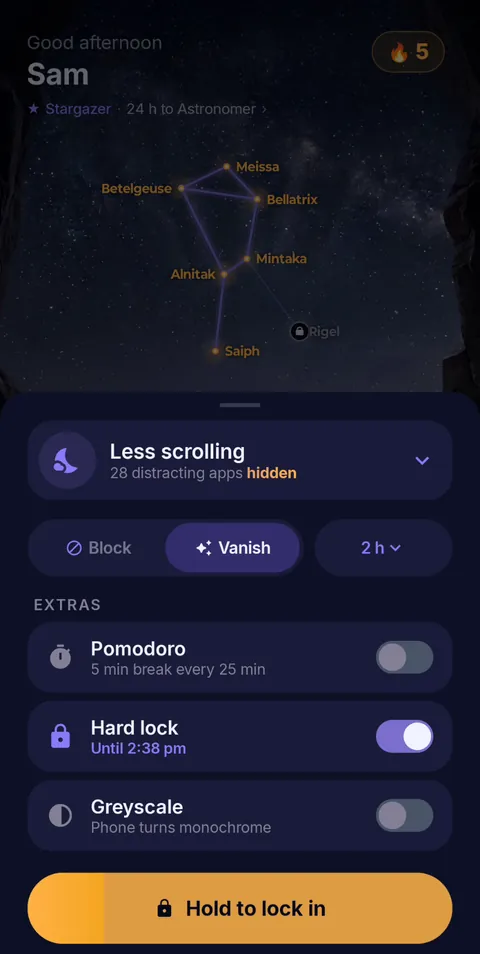 Hold to lock in
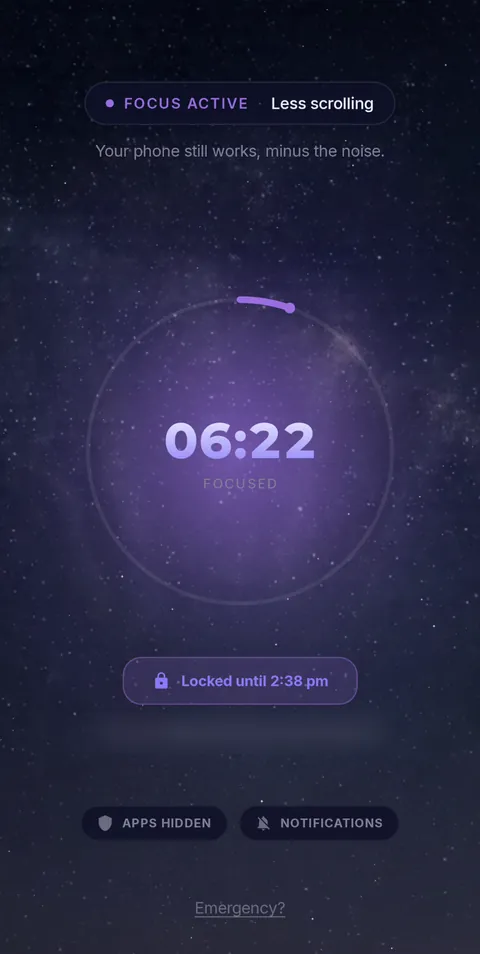 Locked until the timer ends
- Vanish Mode
- Pomodoro 25/5
- Hard lock
- Sessions up to 12 h
- Daily schedules
Study with your distractions out of sight
FocusComet hides Instagram, TikTok, YouTube and anything else you choose for the length of a study session, then brings them back. Free on Android, with Hard lock for exam weeks.
Get it on Google PlayFrequently asked questions
How do I lock my phone while studying?
The simplest lock is distance: put the phone in another room. If you need the phone nearby, use an app that hides or blocks distracting apps for a set study session. For sessions you keep abandoning, use a strict mode such as FocusComet's Hard lock, which can't be ended early.
What is the best app to stop using your phone while studying?
It depends on what breaks your focus. If the visible icon is the problem, an app hider such as FocusComet works well, because the apps disappear for the session. If you end sessions early, choose an app with a strict mode. Forest and similar timers suit people who respond to a reward.
Is there a free app blocker for studying?
Yes. Android's built-in Focus mode is free. FocusComet is free on Android too, with Block Mode, Vanish Mode and an automatic study schedule.
Can I still use my calculator or flashcards while my phone is locked?
With FocusComet, yes. You choose which apps stay available, so study tools such as a calculator, dictionary or flashcard app remain while social media and video are hidden.
How long should a study session be?
Most people do well with 25 to 50 minutes of focused work followed by a 5 to 10 minute break. Start shorter than you think and build up. A session you finish beats an ambitious one you abandon.