
How to block Reels and YouTube Shorts on Android
Most people don't want to quit Instagram or YouTube. They want to keep messages, tutorials and the channels they love, and lose the endless short-video feed. The bad news is that neither app lets you switch the feed off completely. The good news is that there are workable options, and one of them stops the habit rather than just the feed.
Neither Instagram nor YouTube has an off switch for Reels or Shorts. You can limit them with in-app time settings, skip them by using the website or a feed-blocking accessibility app, or remove the trigger by hiding the whole app during the hours you lose to scrolling. Hiding is the bluntest option, but it is the one that doesn't break when the app updates.
Why short-video feeds are so hard to stop
Reels and Shorts are built for one thing: the next swipe. Each video is short enough that “just one more” never feels like a commitment, autoplay removes any natural stopping point, and the feed learns your taste fast. That isn't a lack of willpower on your part. It is a product doing exactly what it was designed to do. More on the psychology in how to stop doomscrolling.
Option 1: the apps' own settings
- YouTube: Set a Shorts feed limit under You › Settings › Time management › Shorts feed limit. You can set it to zero, but when you hit it YouTube only shows a reminder you can dismiss. Turning off and deleting your watch history removes recommendations from the Home feed; pausing alone only stops new videos being saved.
- Instagram: there is no way to remove the Reels tab. Its time-management settings can set a daily limit reminder, and Quiet mode pauses notifications, but you can dismiss both.
Weak spot: these are reminders built by the companies that profit from your scrolling. They are easy to snooze, and the feed is still a tap away.
Option 2: use the website instead of the app
Logging out of the apps and using Instagram or YouTube in a browser adds friction. It's slower, there are fewer autoplay hooks, and you have to type the address. Some people find this is enough on its own.
Weak spot: the mobile websites have short-video feeds too, and reinstalling the app takes thirty seconds on a bad evening.
Option 3: apps that block only the Reels or Shorts screen
Several Android apps use the accessibility service to spot when you open the Reels or Shorts screen and close it, leaving the rest of the app alone. When they work, they are the most precise option.
Weak spot: they depend on the screen layout of Instagram and YouTube. When those apps update, detection can break until the blocker catches up. They also need broad accessibility permissions, so check the privacy policy before you install one.
Option 4: hide the app during your scroll hours
Look at when you actually lose time to Reels. For most people it is a few predictable windows: in bed, after lunch, during study or work. Instead of fighting the feed all day, take the app away during those windows and give it back afterwards.
FocusComet's Vanish Mode does this. Instagram, YouTube, TikTok and anything else you choose disappear from your home screen, app drawer and dock for the session. When the session ends, they come back exactly where they were. It never touches your account, your messages or your saved videos.
- Set a schedule for your worst window, such as 10 pm to midnight. It starts on cue every night.
- Prefer to keep the icons? Block Mode leaves them in place and sends you back when you open one.
- Can't resist ending the session early? Hard lock removes the End button until the timer runs out.
It is blunter than a Shorts-only blocker, because you lose the whole app for that window. But it never breaks on an update, and it removes the cue (the icon and its badge) that started the scroll in the first place.
A combined setup that works
- Set YouTube's Shorts feed limit (zero works), and turn off and delete your watch history to clear Home recommendations.
- Turn off Instagram and YouTube notifications except direct messages.
- Hide both apps during your two worst windows each day.
- Replace the habit: keep something better in your hand. Here are apps to replace doomscrolling.
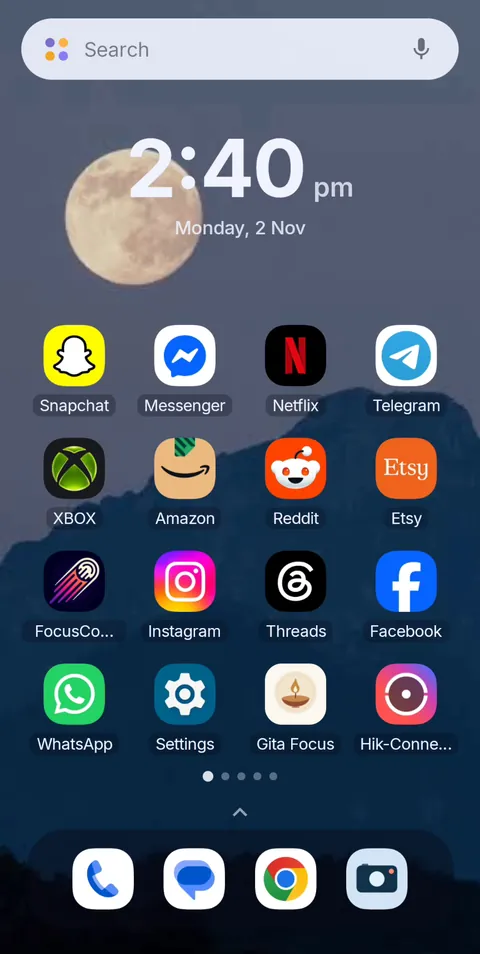 Before
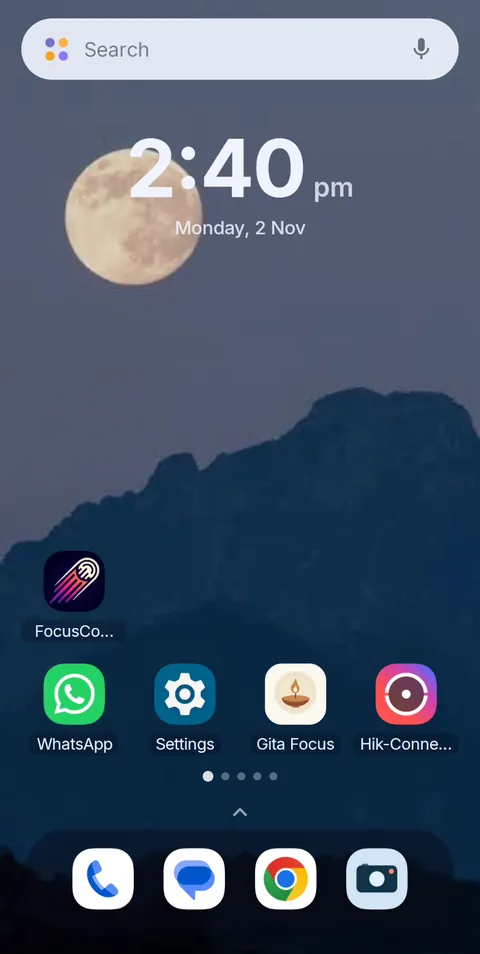 During Vanish Mode
Make the feed disappear for the hours that matter
FocusComet hides Instagram, YouTube and TikTok for the hours you choose, then brings them back untouched. Free on Android, with schedules and an optional Hard lock.
Get it on Google PlayFrequently asked questions
Can you turn off Reels on Instagram?
No. Instagram has no setting to remove Reels. You can set a daily time-limit reminder in its time-management settings, use the website instead, or hide the app during the hours you tend to scroll.
How do I block YouTube Shorts on Android?
YouTube doesn't offer a full Shorts off switch. Set a Shorts feed limit in Settings › Time management (it can be zero, but the reminder can be dismissed), turn off and delete your watch history to remove Home recommendations, try a Shorts-blocking accessibility app, or hide YouTube during your scroll hours with an app like FocusComet.
Can FocusComet block only Reels and keep Instagram messages?
No. FocusComet works on whole apps. It hides or blocks Instagram for a session, then brings it back. If you need Instagram messages during that time, a Reels-only blocker is a better fit for that window.
Why do Shorts blockers stop working?
They detect the Reels or Shorts screen by its layout, so when Instagram or YouTube changes that layout in an update, detection can break until the blocker is updated.
How do I stop scrolling Reels at night?
Hide Instagram, YouTube and TikTok on a schedule that starts an hour before bed, charge your phone away from the bed, and keep a book or audio app as the easy alternative.