
How to quit social media without deleting your accounts
“Delete everything” is the classic advice, and it rarely sticks. Your photos live there, your friends message you there, and events and groups are organised there. So most people delete the app, last a week, reinstall it, and feel worse. There is a middle path that keeps the accounts and loses the habit.
Separate the account from the app. Keep your accounts and data, but remove the apps from your daily view: hide them for most of the day, keep messaging separate, and give yourself one short, deliberate window. It's quitting the scroll, not the people.
Why cold turkey usually fails
- You lose real things: group chats, event invites, a photo archive, sometimes work contacts.
- The urge doesn't vanish: it just moves to the next app, or back to the same one after a reinstall.
- All or nothing: one slip feels like failure, so people give up completely.
Step 1: decide what you actually need
Write down what you use each platform for. Usually it's a short list: messages from a few people, one group, maybe a marketplace. Everything else, the feed, Reels, Explore and Stories, is what you are quitting.
Step 2: move the useful parts out
- Move important conversations to a messaging app you already use.
- Download your photo archive (every major platform offers a data download in its settings).
- Turn on email notifications for the one group or page you can't miss.
Step 3: take the apps out of your day
This is where most attempts go wrong. Deleting the app works until a bad evening. Leaving it on the home screen keeps the cue in front of you all day.
A focus app can make the apps disappear for the hours you are quitting. With FocusComet's Vanish Mode, Instagram, TikTok, Facebook and anything else you pick vanish from your home screen, app drawer and dock during a session. Your accounts, messages and photos stay exactly as they were. Put the session on a schedule so it runs every day without a decision.
Step 4: keep one small window, on purpose
Allow 15 to 20 minutes a day, at a set time, on a computer if you can. Planned use is very different from reflex use, and it removes the “I'll never see it again” panic that drives relapse.
Step 5: make the first 30 days strict
The first month is when the habit fights back. If you keep ending sessions early, use a lock you can't undo. FocusComet's Hard lock removes the End button until the timer runs out.
Step 6: fill the gap
Social media filled real needs: connection, news, boredom relief. Replace each one on purpose: call or meet the people you care about, pick one news source, and keep something in your pocket that isn't a feed. Ideas in apps to replace doomscrolling.
What to expect
Most people report the first week as the hardest: reaching for the phone, feeling out of the loop. After that, the urges usually fade and the time comes back. If you slip, don't restart from zero. Just start the next session.
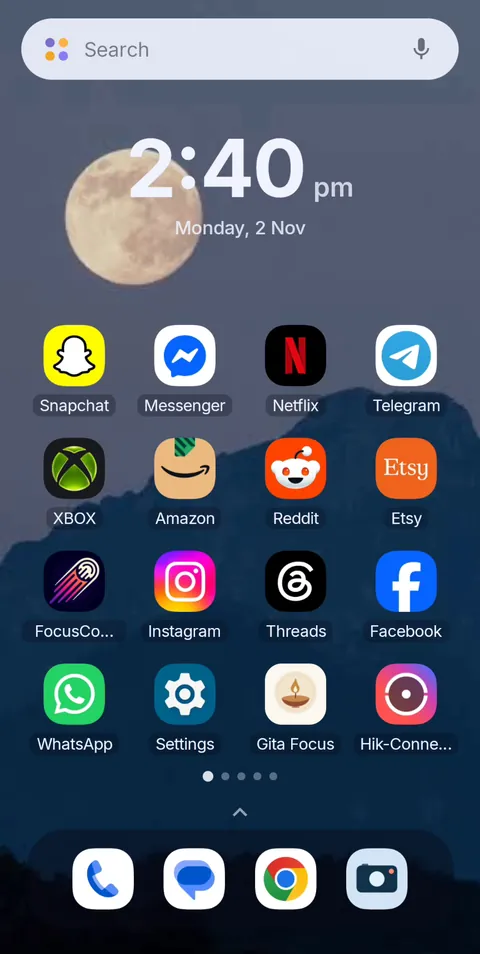 Before
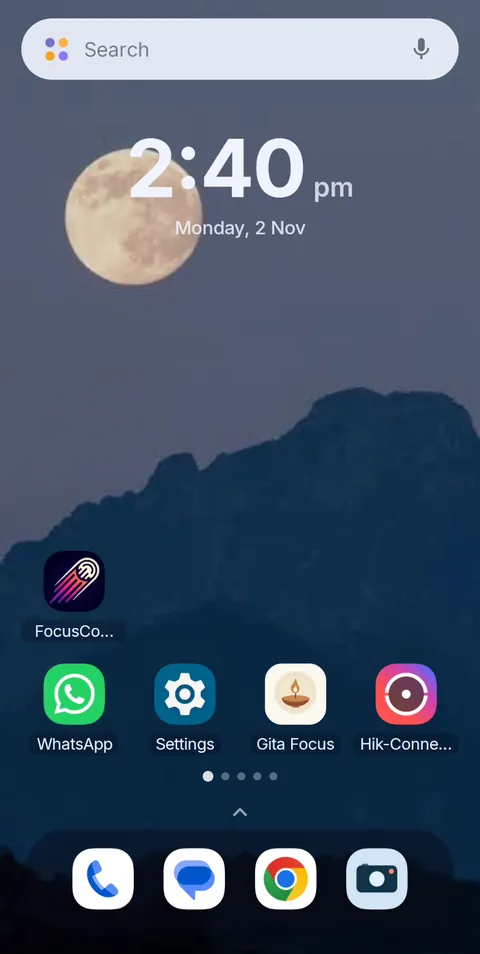 During Vanish Mode
Quit the scroll, keep the accounts
FocusComet makes social apps disappear for the hours you choose and brings them back untouched. Nothing deleted, no data lost. Free Forever plan on Android.
Get it on Google PlayFrequently asked questions
Can I quit social media without deleting my account?
Yes. Keep the account and data, but remove the apps from your daily view by hiding them during set hours, and allow one short, planned window to check in.
How do I quit social media for good?
Decide what you actually need from each platform, move those parts elsewhere, hide the apps for most of the day, and keep the first 30 days strict. Replacing what social media gave you matters as much as removing it.
Is it better to deactivate or delete social media?
Deactivating or simply hiding the apps keeps your options open and your data safe. Deleting is permanent and often leads to reinstalling. Start with hiding and see how you feel after a month.
What happens when you quit social media?
Many people find the first week hardest, with frequent urges and a feeling of missing out. After that, urges tend to fade and people report more free time and fewer comparisons, though experiences vary.
Will hiding Instagram delete my messages or photos?
No. FocusComet only hides the app on your phone for a session. Your account, messages and photos are untouched.