
How to stop phone distraction during JEE, NEET, UPSC, GATE and CAT prep
The advice “just keep your phone away” doesn’t fit most aspirants. Your lectures are on it, your test series is on it, your doubts group is on it. So is Instagram, one thumb away from all of that. You need to keep the phone and lose the distraction.
Don’t fight the whole phone. Hide only the apps that steal your time, keep your study apps, fix your study blocks to your timetable, and lock yourself in during the final months.
Why exam prep makes this harder
You’re on your phone for good reasons many times a day, so every lecture is one notification from an hour of Reels. Prep also runs for months or years, and on the low days, scrolling is the easiest escape there is. Willpower alone won’t last that long.
Step 1: Split your apps in two
List the apps you need: your coaching app, YouTube if your lectures are there, PDFs, a calculator, your test series. Then list the apps that only cost you: Instagram, Snapchat, games, shopping. Be honest about WhatsApp. Mute big groups, even if you keep the app.
Step 2: Make the second list disappear
Create a FocusComet profile named after your exam. In Vanish mode those apps vanish from your home screen, drawer and dock for each session, and come back when it ends. Nothing gets deleted, so you don’t have the drama of reinstalling Instagram every Sunday.
If YouTube is both your teacher and your trap, watch lectures on your coaching app or a laptop where you can, or hide YouTube during problem-solving blocks when you don’t need it.
Step 3: Match sessions to your timetable
| Block | Session |
|---|---|
| Morning concepts | 2 to 3 hour session, apps hidden |
| Afternoon problems or PYQs | Pomodoro on, for apps back every 25 minutes |
| Evening revision | Plain session |
| Mock test days | Hard lock for the full paper length |
A schedule can start your block on cue. Block mode schedules begin by themselves, and Vanish mode schedules begin with one tap on the reminder.
Use a different phone setup for each Indian exam
| Exam | Keep available | Best focus setup |
|---|---|---|
| IIT JEE / NEET | Coaching app, PDFs, test series, calculator where permitted | Long subject blocks plus a strict mock-test profile |
| UPSC / MPSC | Current-affairs sources, notes, dictionary, maps | Recurring morning schedule; hide social feeds without hiding research tools |
| GATE / SSC CGL | Practice questions, formula notes, calculator | 50- to 90-minute blocks; Hard lock for full mocks |
| CAT | Mock platform, vocabulary and test-analysis tools | Timed section practice with a narrow allowlist |
| CBSE boards | School groups, textbook PDFs, lecture videos | Pomodoro for avoided chapters; longer blocks for papers |
Do not build one brutal profile for the entire day. Create a normal daily profile you can repeat for months and a smaller, stricter mock-test profile. The daily profile protects consistency. The mock profile protects the exact two or three hours that must not break.
Step 4: Lock in for the last months
Hard lock is for when you no longer trust yourself. Hold to lock in, and there’s no End button until the timer finishes, and Android Settings stay blocked too. Run up to 12 hours in a single session on study holidays.
Step 5: Keep score
Long prep feels endless because progress is invisible. FocusComet shows your focus hours and streak, and turns those hours into stars and constellations. Add your study partners as friends and compete on real hours rather than claimed ones. Weekly reports show when you actually focus best.
Don’t forget the basics
Protect your sleep, take one real rest block a week, and talk to someone when the pressure gets heavy. No app replaces that. Long preparation is a marathon, and resting is part of the training.
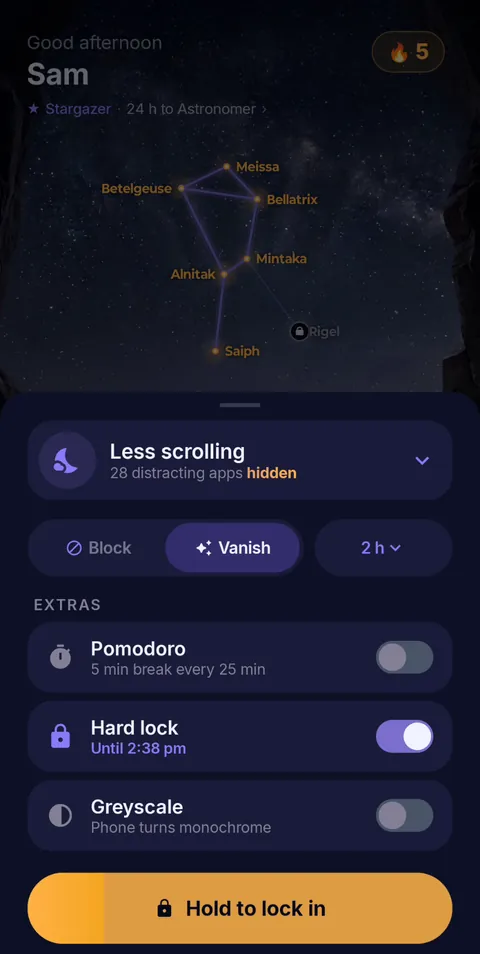 Hold to lock in
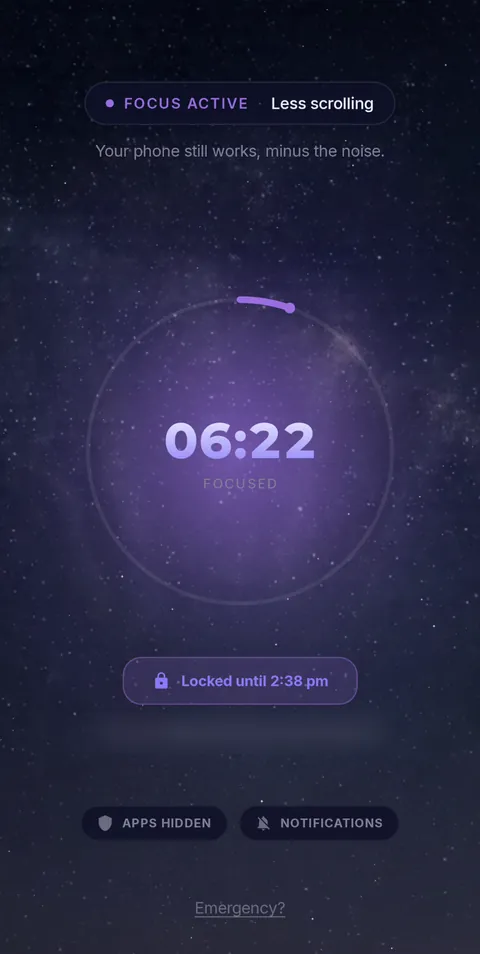 Locked until the timer ends
- Vanish Mode
- Pomodoro 25/5
- Hard lock
- Sessions up to 12 h
- Daily schedules
Keep your lectures. Lose the Reels.
FocusComet hides only the apps you pick, so your study apps stay. Free on Android, with Hard lock and sessions up to 12 hours for the long prep days.
Get it on Google PlayFAQ
How can I stop using my phone while preparing for NEET or JEE?
You probably can’t stop using it entirely, so hide the distracting apps during study blocks and keep your lecture and test apps available.
Can I block Instagram but keep my study apps?
Yes. In FocusComet you choose exactly which apps to hide, per profile. Everything else keeps working.
Can I lock my phone for hours while studying?
Yes. Sessions run up to 12 hours, and Hard lock removes the End button until the timer finishes.
Is FocusComet free for students?
Yes. Block and Vanish mode, Pomodoro and a schedule are free on Android.