
The Pomodoro app that actually blocks your apps
A Pomodoro timer has one weakness: it sits politely in the corner while you open Instagram. If the timer can’t touch your phone, the only thing keeping you on task is the willpower you were trying to save.
You want a Pomodoro app that controls your phone, not one that only counts. FocusComet makes distracting apps disappear (or refuse to open) for each 25-minute round, gives them back for the 5-minute break, then takes them away again by itself.
Why a plain Pomodoro timer stops working
The technique is simple: 25 minutes of focus, 5 minutes of break, repeat. The trouble starts in minute 11, when the work gets hard and your thumb goes looking for relief. A timer can’t stop that. It carries on counting while you scroll, and by the time you look up, the round is gone.
That’s why so many people search for a Pomodoro app with an app blocker. The rhythm was never the problem. The open door was.
What to look for in a Pomodoro app for Android
- Automatic switching. Apps should lock and unlock with the rounds, with no tapping from you.
- Breaks that are real. If your apps stay locked on breaks, you’ll quit the whole system by Wednesday.
- Something strict for bad days. You need a way to stop yourself ending the session at minute 12.
- Long sessions. A serious study day is many rounds, so the app should run them as one session.
Best Pomodoro apps that block apps: compared
| App | Pomodoro | App control | Best for |
|---|---|---|---|
| FocusComet | Fixed 25/5; apps return automatically on breaks | Hide apps, redirect them, or add Hard lock | Android students who want one session to control the phone |
| Focus To-Do | Flexible timer plus tasks | Timer-led rather than strict Android blocking | Planning work and tracking Pomodoros |
| Forest | Focus timer with a growing tree | Motivation rather than a comparable hard lock | People driven by a visible reward |
| AppBlock | Blocking schedules rather than a Pomodoro-first workflow | Strong rules and Strict Mode | People who value blocking controls over a study timer |
| Digital Wellbeing | No complete Pomodoro workflow | Built-in Focus Mode that can be paused | A free, gentle starting point |
Checked against official product information on 1 November 2026. Features and prices can change. The decisive question is not which timer looks best; it is what happens when you tap Instagram in minute eleven.
How Pomodoro works in FocusComet
- Pick a length of 25 minutes or more. Turn on Use Pomodoro technique in the session sheet.
- Focus for 25 minutes. In Vanish mode your chosen apps disappear from the home screen, app drawer and dock. In Block mode the icons stay, and opening one bounces you back.
- Break for 5 minutes. Your apps come back on their own. Use them guilt free.
- Back to it. When the break ends, the apps vanish again. There’s nothing to restart.
The rounds repeat for the whole length you picked: a 1-hour session is 25, 5, 25, 5, and a 2-hour session is four full cycles with 1 hour 40 minutes of focus. Only focus minutes count toward your stars, streak and stats, so breaks never inflate your numbers.
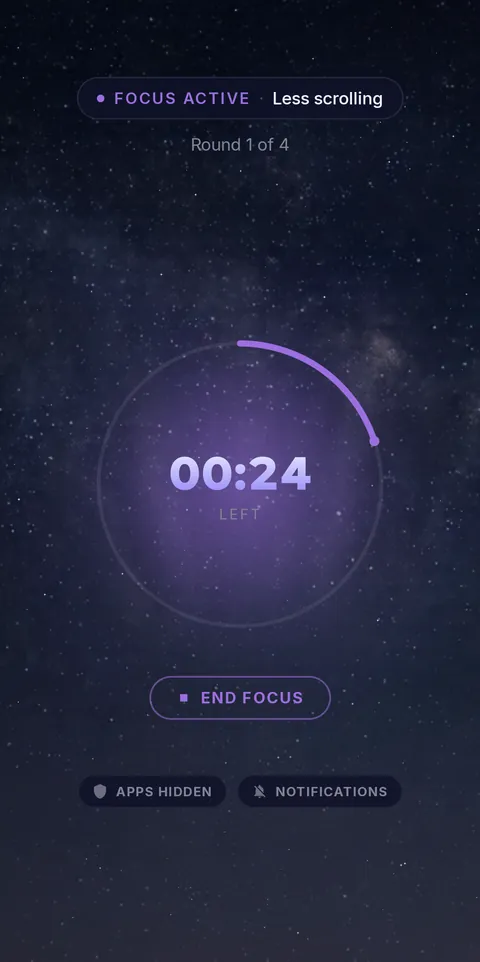 Focus round: apps gone
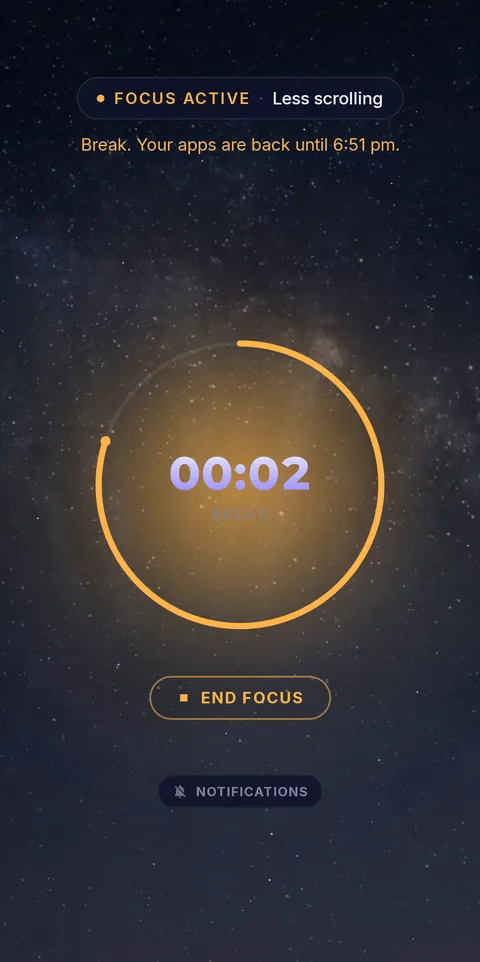 Break: apps back
The part timers can’t do: Hard lock
Turn on Hard lock and hold to lock in. The End button is gone for the whole session and Android Settings stay blocked, breaks included, so you can’t talk yourself out of it mid-round. Your apps still return on breaks, because the break is part of the deal. A real emergency has its own link, and support can end the session for you.
Pomodoro timer vs Pomodoro app with blocking
| Plain timer | FocusComet | |
|---|---|---|
| Counts 25/5 | Yes | Yes |
| Removes apps during focus | No | Yes |
| Gives apps back on breaks | They never left | Automatically |
| Stops you quitting early | No | Yes, with Hard lock |
| Silences notifications | Rarely | All session |
What it doesn’t do
Straight answers, so you don’t find out later. FocusComet runs 25/5 only for now, with no custom lengths and no long break. A 25-minute session is one round with no break. Schedules start normal sessions, not Pomodoro ones. It’s Android only.
25 minutes without Instagram. 5 minutes with it.
Pomodoro is included free in FocusComet, with Block and Vanish mode. For the long days there are sessions up to 12 hours and Hard lock.
Get it on Google PlayFAQ
Is there a Pomodoro app that blocks apps?
Yes. FocusComet for Android hides or blocks the apps you choose during each 25-minute round and returns them on the 5-minute break, automatically.
What is the best Pomodoro app for Android?
If your problem is your phone, pick one that controls your apps rather than only counting. FocusComet does that. If you only need a clock on a desk, any simple timer will do.
Is the Pomodoro feature free?
Yes. Pomodoro is included free in FocusComet.
Can I change the 25 and 5 minutes?
Not yet. FocusComet runs the classic 25/5 rhythm only, and needs a session of at least 25 minutes.
Do I have to restart the timer after each break?
No. It’s one continuous session. Apps return and vanish again by themselves.
Compare the whole focus-to-break cycle
A timer and a blocker can disagree about when a break starts. Before choosing an app, test a complete round—not just the countdown screen.
| Check | Why it matters | FocusComet |
|---|---|---|
| App access on breaks | A timer alarm does not prove apps unlock | Selected apps return during five-minute breaks |
| Next round | Restarting manually adds a decision | The next 25-minute focus round restricts the selected apps again automatically |
| Custom intervals | 50/10 is not equivalent to 25/5 | Fixed 25/5 only; use a normal longer session for other work |
| Notifications | App availability and notification settings are separate | Check chosen Do Not Disturb and notification-pause behaviour on your device |
AppBlock's current pricing documentation lists Quick Block Timer & Pomodoro. Check the Android configuration and current tier instead of assuming it is only a scheduler. Compare Focus To-Do alternatives and Engross alternatives if task management or timer flexibility is your priority. Source: AppBlock official plans.