
How to get iPhone-style Focus modes on Android
iPhone Focus modes let you create a Work, Study or Sleep profile that filters notifications, changes your home screen and turns on by itself at set times. Android users keep asking for the same thing. Android has pieces of it built in, and the home-screen part is where a focus app comes in.
Android's built-in Focus mode pauses apps, Do Not Disturb or Modes filter notifications, and Samsung Modes and Routines automate them. What's missing is a home screen that changes per profile. FocusComet adds that: each profile hides its own set of apps and can run on a schedule.
What iPhone Focus modes actually do
- Filter notifications by person and app.
- Change the home screen, showing only chosen pages for that Focus.
- Turn on automatically by time, place or app.
- Separate profiles for work, personal time, sleep and more.
What Android has built in
- Digital Wellbeing Focus mode: pauses chosen apps on demand or on a schedule. It's one list, not several profiles.
- Do Not Disturb, and Modes on newer Pixels: filter calls and notifications, with schedules. Recent Pixel updates let you create several named modes.
- Samsung Modes and Routines: the closest match. Create Work, Sleep or Study modes that change sound, wallpaper and notification rules, triggered by time or place.
- Bedtime mode: greyscale and silence at night.
The gap: none of these give you a different home screen per mode, and paused apps stay visible as grey icons.
Filling the gap with profiles that hide apps
FocusComet works like a set of focus profiles for Android. Each profile has its own list of apps:
- Work hides social media and video but keeps Slack and email.
- Study hides games and video but keeps your calculator and flashcards.
- Wind-down hides work apps and feeds in the evening.
In Vanish Mode a profile's apps disappear from your home screen, app drawer and dock for the session, so the home screen changes with the mode. That's the iPhone feature Android lacks. Block Mode keeps the icons and bounces you back instead. Profiles can run on schedules. Block Mode schedules start by themselves, and Vanish Mode schedules start with one tap from an alert.
Build a profile for each part of your day, Work, Study, Sleep, and give each one its own schedule.
A setup that mirrors iPhone Focus
- Use Do Not Disturb or Modes for notification filtering.
- Use FocusComet profiles for what's on your home screen.
- Schedule both for the same hours.
- On Samsung, add Modes and Routines for wallpaper and sound changes.
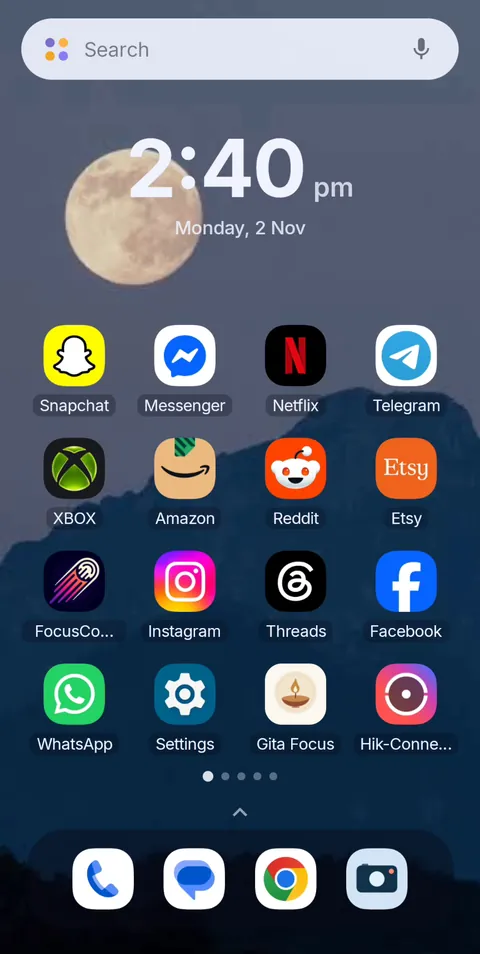 Before
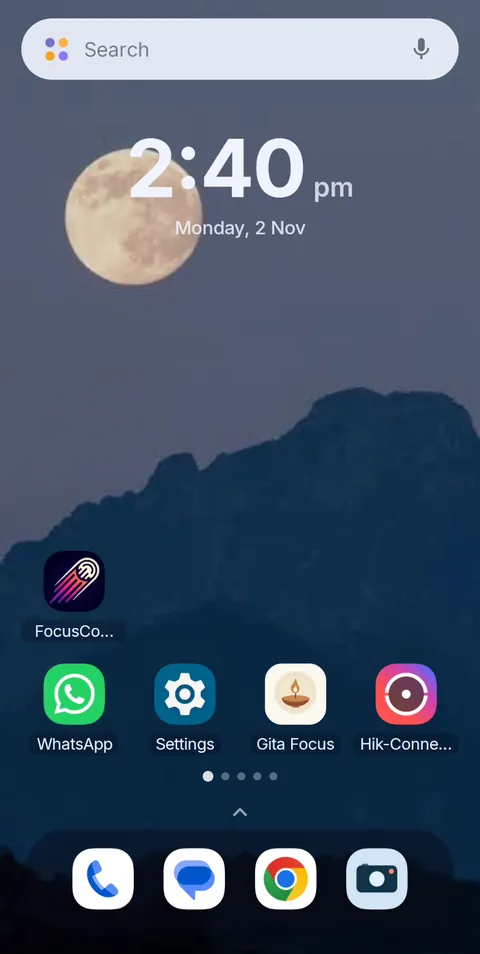 During Vanish Mode
Focus profiles for your Android home screen
FocusComet gives each part of your day its own profile, hiding or blocking a different set of apps, on a schedule if you like. Free Forever plan on Android.
Get it on Google PlayFrequently asked questions
Does Android have Focus modes like iPhone?
Partly. Android has Focus mode for pausing apps, Do Not Disturb or Modes for notifications, and Samsung Modes and Routines for automation. It lacks per-mode home screens, which focus apps like FocusComet add.
How do I create a Work focus on Android?
Set Do Not Disturb or a mode to allow only work contacts, then create a FocusComet Work profile that hides social and video apps during work hours, ideally on a schedule.
Can Android change the home screen for each focus?
Not natively. FocusComet's Vanish Mode hides each profile's apps from the home screen, app drawer and dock during a session, so the home screen changes with the profile.
Is Samsung Modes and Routines the same as iPhone Focus?
It's the closest built-in equivalent, with time and place triggers and settings changes. It doesn't hide apps from the home screen, so pair it with an app hider for that part.