
Stay Focused Alternatives for Android: Blocking or Hiding?
Stay Focused is a serious rule-based blocker. Replacing it only makes sense if you need a different workflow—not another app with the same checkbox list.
Choose the workflow you actually need
| Need | Better starting point | Why |
|---|---|---|
| Detailed app and website rules | Stay Focused or AppBlock | Compare conditions, schedules and strict controls |
| Remove tempting icons during study | FocusComet | Vanish Mode hides selected apps temporarily |
| Timer plus task management | Focus To-Do or Engross | Planning is the centre of the workflow |
Keep Stay Focused when rules are the point
If your successful setup depends on detailed restrictions, preserve it. Document the actual rule: usage duration, schedule or strict access condition. A simpler app is not automatically an upgrade if it cannot reproduce that rule.
Stay Focused’s official terms describe app and website blocking, notifications, schedules and Strict Mode, while noting operating-system and device limitations. Judge the Android version on your own device rather than borrowing claims from its iOS help.
Switch when seeing the icon is the trigger
FocusComet approaches the moment before the tap. Vanish Mode removes selected apps from view while keeping them installed. Use Block Mode if you prefer a visible boundary. Add fixed 25/5 Pomodoro when a timed work/break rhythm matters.
It is a genuinely different approach. And when you want it strict, Hard lock removes the End button and blocks Settings until the timer runs out.
What Stay Focused does well
Stay Focused, from InnoXApps, is a rule engine: block apps, websites and even keywords, set daily usage limits and time windows, and protect it all with a Strict Mode that can demand a PIN, an expiry date, a QR scan or a long random text before it lets go. With millions of installs, it is one of the best-known blockers on Google Play.
Rules are powerful, but they ask a lot of you: you build them, maintain them and negotiate with them. If you spend more time tuning limits than studying, a simpler approach may hit harder.
Why people switch from rules to vanishing
FocusComet skips the rulebook. Pick your distractions, pick a duration, start. Vanish Mode clears those apps off your home screen, app drawer and dock, so there is nothing to tap and nothing to negotiate with. When the timer ends, every app is back exactly where it was.
Want structure? Schedules start your sessions for you, Pomodoro handles the 25/5 rhythm, Allow-only keeps just the apps you need, and Hard lock removes the End button for sessions you refuse to quit. See everything FocusComet does.
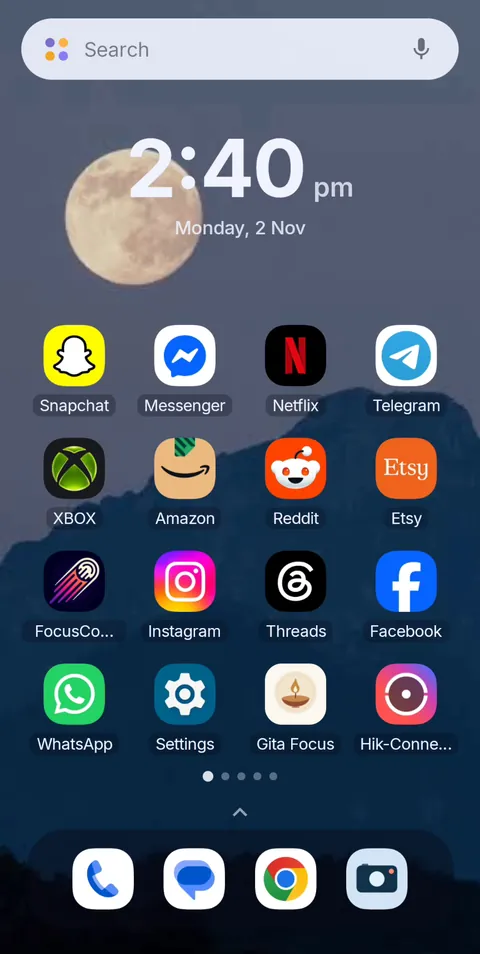 Before
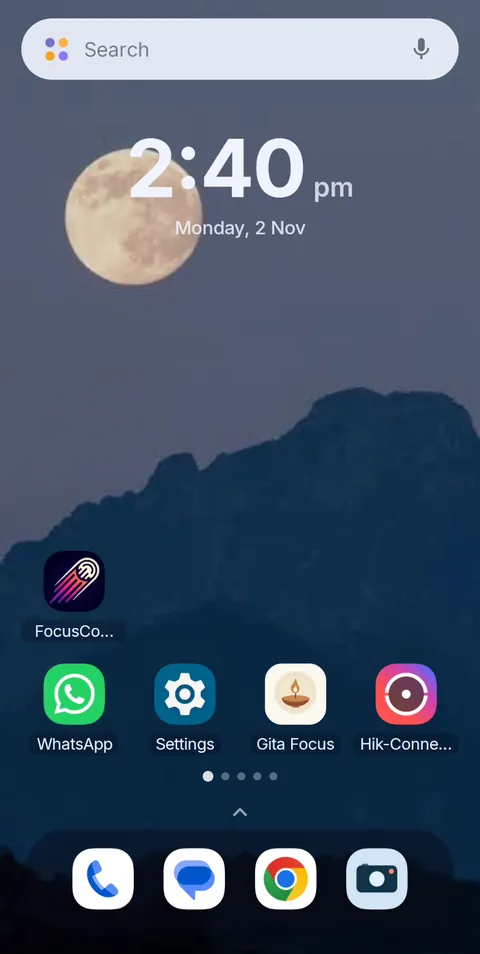 During Vanish Mode
Frequently asked questions
What is the main difference between Stay Focused and FocusComet?
Stay Focused blocks apps you try to open, based on rules and limits you set. FocusComet removes the temptation before you try: the apps vanish from your screens for the session.
Can FocusComet block websites like Stay Focused?
FocusComet works on apps. If website and keyword rules are essential to you, Stay Focused or AppBlock covers that job.
Sources and scope
Stay Focused details come from its official site, terms and Google Play listing; FocusComet details come from our own feature page. Checked November 2026.