Best focus apps for exam preparation on Android
A normal focus app is tested on an ordinary Tuesday. An exam focus app is tested when the syllabus is unfinished, the mock test starts in ten minutes and your thumb opens Instagram before you notice. This guide compares the tools that still matter under that pressure.
Best all-in-one Android setup: FocusComet for app hiding, Pomodoro, long sessions and optional Hard lock. Best for complex blocking rules: AppBlock or Stay Focused. Best simple reward timer: Forest. Best Pomodoro plus task list: Focus To-Do. Best free built-in start: Android Digital Wellbeing.
Best exam focus apps: quick comparison
| App | Best for | Strict mode | Pomodoro | Honest limit |
|---|---|---|---|---|
| FocusComet | Keeping study tools while distracting apps disappear | Hard lock | Yes, apps return on breaks | Android only; no website blocking |
| AppBlock | Detailed schedules, conditions and websites | Strict Mode | Pomodoro listed; check Android plan | Useful strict features are paid |
| Stay Focused | Granular usage limits and blocking rules | Strict Mode | No integrated exam rhythm | Power comes with setup complexity |
| Forest | A simple timer with a visible reward | No comparable hard lock | Timer-led focus | A tree cannot stop a determined exit |
| Focus To-Do | Pomodoro plus tasks and planning | No comparable hard lock | Core feature | Stronger planner than blocker |
| Digital Wellbeing | A free built-in starting point | Easy to pause | Focus Mode, not full Pomodoro | Designed for gentle control |
We compared Android availability, Pomodoro behaviour, app control, schedules, reusable profiles, long-session support, allowlists, notification control, strict mode, price and account requirements. This is a FocusComet-published editorial comparison based on official product documentation, not an independent hands-on benchmark.
Pick by the moment you lose focus
You cannot start
Use Pomodoro. A 25-minute promise is small enough to begin. Focus To-Do is strong when tasks matter; Forest adds a reward; FocusComet adds the missing phone control by hiding or blocking selected apps during each round and restoring them on the five-minute break.
You start, then check social media
Use a selective blocker. Do not lock the whole phone if it contains your lecture app, calculator, dictionary or class messages. Build an allowlist or choose only the distractions. FocusComet's Vanish Mode wipes the chosen icons off your home screen, app drawer and dock, while the apps you need stay one tap away.
You end every block early
Use strict mode. FocusComet calls it Hard lock: the End button disappears and Android Settings stays shut until the timer ends. AppBlock and Stay Focused offer their own strict systems. Compare the escape route, not the feature name.
You study for eight to twelve hours
Do not confuse a long day with twelve uninterrupted hours. Use multiple real blocks, meals, movement and sleep. A long-session app should keep the same rules running without forcing you to rebuild them after every break. FocusComet runs sessions up to 12 hours and can run 25/5 rounds inside the session.
Exam-specific setups that actually differ
India: IIT JEE, NEET, UPSC, GATE, CAT, SSC CGL and boards
Keep lecture platforms, PDFs, test-series apps, WhatsApp if coaching depends on it, and the calculator where permitted. Remove Reels, Shorts, games and shopping. Use a normal scheduled block for daily coaching and Hard lock only for mock tests or the final high-pressure weeks. See the detailed NEET, JEE and UPSC phone-distraction guide.
United States and Canada: SAT, ACT, AP, MCAT and LSAT
Timed practice is the key difference. Match the lock to the real section length, allow only the test or timer tools you need, and keep the phone physically out of reach for full-length mocks. For MCAT and LSAT, the best app is not the one with the prettiest streak; it is the one that cannot become another task to manage.
United Kingdom: GCSE, A-level and UCAT
Use short Pomodoro rounds for avoided revision and longer blocks for past papers. UCAT practice is timed, so test the exact allowlist before the session. A blocker that breaks your calculator, question bank or authentication app is not strict; it is badly configured.
Australia and New Zealand: ATAR, HSC, VCE and NCEA
Build one reusable profile for content review and another for timed practice. The review profile can keep notes and videos. The mock profile should be smaller and stricter. Recurring schedules help during the months before the exam; a manual hard lock belongs on deliberate mock sessions.
Germany and the Netherlands: Abitur, Staatsexamen, VWO and tentamens
Long reading and problem sets suit 50- to 90-minute blocks better than constant 25-minute interruptions. Use Pomodoro to start, then switch to a longer session when concentration arrives. For Staatsexamen and tentamens, make separate profiles for reading, memorisation and practice questions.
Japan, South Korea and Singapore: Common Test, juken, Suneung/CSAT, O-level and A-level
These exam cycles reward repeatable routines more than heroic one-day locks. Schedule the ordinary weekday profile, keep essential communication available, and reserve strict mode for mocks and the last hour of a difficult day.
Country-specific exam focus guides
- Best Focus Apps for GCSE, A-Level and UCAT Revision
- Best Focus Apps for SAT, ACT, AP, MCAT and LSAT Prep
- Best Focus Apps for Canadian University Exams and MCAT
- Best Focus Apps for ATAR, HSC and VCE Study
- Best Focus Apps for NCEA Revision in New Zealand
- Die besten Fokus-Apps fürs Abitur und Staatsexamen
- Beste focus-apps voor VWO-eindexamens en tentamens
- 共通テスト・受験勉強におすすめの集中アプリ【Android】
- 수능 공부 집중 앱 추천: 앱 차단과 뽀모도로 비교
- Melhores apps de foco para estudar para o ENEM
- Best Focus Apps for Singapore O-Level and A-Level Revision
- Meilleures applications de concentration pour réviser le bac
- Apps de concentración para la PAU, EBAU y Selectividad
- Migliori app per concentrarsi durante la maturità
The best setup is a two-profile system
- Daily study profile: block feeds, games and entertainment; keep calls, messages, notes, lectures and calculator; start from a recurring schedule.
- Mock-test profile: allow only the test essentials; choose the exact exam duration; turn on strict mode only after checking every allowed app.
This is stronger than making the daily profile unbearable. A system you can repeat for months beats a maximum-security lock you avoid starting.
What FocusComet does differently
Traditional blockers leave every distracting icon visible and intervene after you tap. FocusComet can remove the selected apps from view in Vanish Mode. Block Mode keeps the icons and redirects them. Pomodoro returns the apps on each break. Add Hard lock, sessions up to 12 hours, a schedule on every profile, allow-only profiles, weekly reports and per-app notification pause, and the phone is built for exam season.
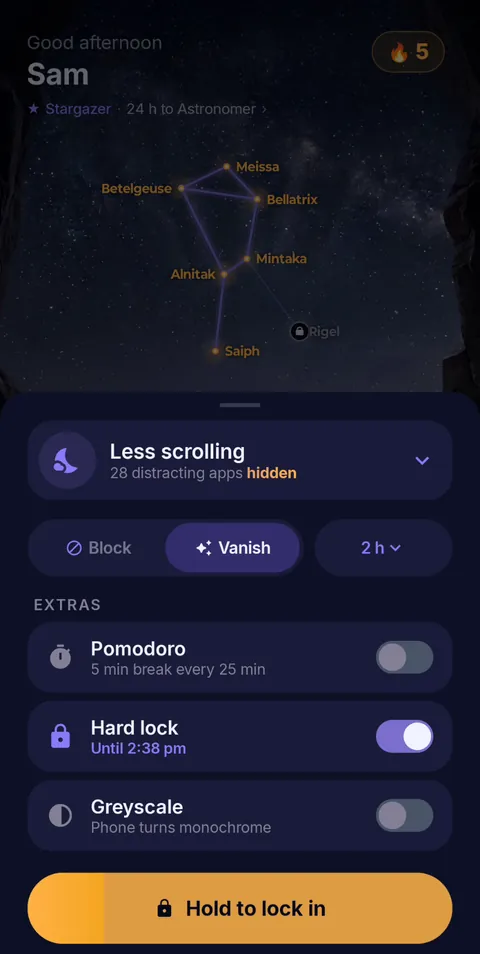 Hold to lock in
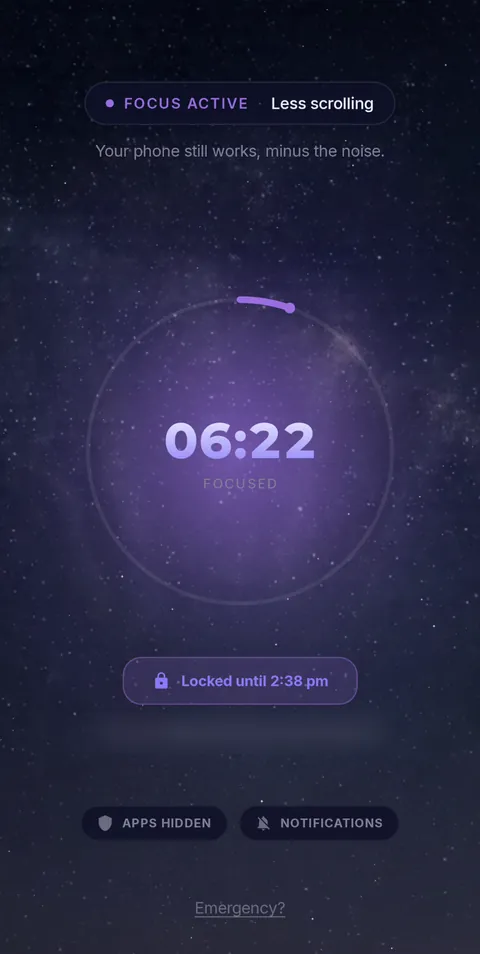 Locked until the timer ends
- Vanish Mode
- Pomodoro 25/5
- Hard lock
- Sessions up to 12 h
- Daily schedules
FocusComet does not block websites and is not available on iPhone. If browser sites are your main distraction, use a website blocker or hide the browser during the session.
Your exam phone should contain the exam, not the escape hatch.
Build profiles for daily revision and mock tests. Hide the apps that pull you away. Add Pomodoro when starting is hard and Hard lock when quitting is the problem.
Get FocusComet on Google PlayFrequently asked questions
What is the best focus app for exam preparation on Android?
Choose by failure point. Pomodoro helps you start, selective blocking stops interruptions, and strict mode stops early exits. FocusComet combines all three on Android; AppBlock and Stay Focused suit more complex blocking rules.
Which app blocker is best for mock tests?
Choose a timed strict mode with an allowlist. Check the calculator, notes or test app before locking. A strict session with the wrong allowlist can ruin the mock.
Should I use Pomodoro for exam revision?
Use 25/5 rounds to start avoided work. Use longer 50- to 90-minute blocks for deep problem-solving once you are moving.
Can I block social media for a 10 or 12 hour study day?
Yes, but keep essential apps available and take real breaks. FocusComet supports sessions up to 12 hours; the goal is a controlled phone, not twelve uninterrupted hours.
English editions of local exam guides
- Best Focus Apps for Abitur, Staatsexamen and Exams in Germany
- Best Focus Apps for VWO Finals and University Exams in the Netherlands
- Best Focus Apps for Japan’s Common Test and Juken Study
- Best Focus Apps for Suneung / CSAT Study in South Korea
- Best Focus Apps for ENEM Preparation in Brazil
- Best Focus Apps for Baccalauréat Revision in France
- Best Focus Apps for PAU, EBAU and Selectividad in Spain
- Best Focus Apps for Maturità Exam Preparation in Italy